Microsoft’s introduction of Delegated Managed Service Accounts (dMSAs) in Windows Server 2025 was supposed to improve security by replacing those messy legacy service accounts we’ve all been dealing with for years. But in late May 2025, security researchers found a devastating flaw in the dMSA implementation—they’re calling it “BadSuccessor”—and it can lead to complete domain takeover.This would be a 3 part blog with the first part digging into dMSA design and PAC flaw.
I’ve been diving deep into how dMSAs work, their authentication mechanisms, and the cool security flaws that let attackers go from minimal privileges to Domain Admin access by changing just two attributes. Let me walk you through what I found.
Understanding Delegated Managed Service Accounts (dMSAs)
What is a dMSA?
A Delegated Managed Service Account (dMSA) is Microsoft’s latest attempt at fixing service account management, introduced in Windows Server 2025. Unlike traditional service accounts where you’re constantly rotating passwords manually (or more likely, setting them to never expire—Don’t worry, we all have), dMSAs are supposed to be automatically managed by Active Directory with better security features.
The whole point is replacing legacy service accounts with modern, automatically managed accounts that don’t break your services during migration. Sounds great in theory.
Key Benefits (or so they claimed):
- Automatic password rotation
- Better security posture
- Seamless migration from legacy accounts
- Centralized management through Active Directory
The Migration Architecture
Here’s where things get interesting. dMSAs are designed to replace existing legacy service accounts through a structured migration process. This creates a link between the new dMSA and the old account it’s replacing—both accounts become aware of each other, which enables that “seamless transition” without service downtime that Microsoft promised.
The migration process involves several critical Active Directory attributes that, spoiler alert, become the attack vector:
On the dMSA object:
msDS-GroupMSAMembership- Controls which systems can use the dMSAmsDS-ManagedAccountPrecededByLink- Points to the domain name of the old service accountmsDS-DelegatedMSAState- Tracks where we are in the migration
On the old account being replaced:
msDS-SupersededManagedAccountLink- Points to the domain name of the new dMSAmsDS-SupersededServiceAccountState- Migration status from the old account’s perspective
The dMSA Migration Process
Phase 1: Starting the Migration
Command: Start-ADServiceAccountMigration
When you start a migration, Active Directory does several things that’ll become important later:
- Sets migration status to “in progress” (
msDS-DelegatedMSAState = 1) - Grants write permissions to the old account on the dMSA’s
msDS-GroupMSAMembershipattribute - Creates bidirectional links between the dMSA and the old account
- Updates security descriptors to make the migration work
Here’s the thing—during migrations, the old account gets temporary write access to msDS-GroupMSAMembership on the dMSA for smooth host authorization. While this isn’t directly exploited in BadSuccessor, it shows the overly trusting design that attackers can abuse by faking a migration entirely from the dMSA side.
Phase 2: Finishing the Migration
Command: Complete-ADServiceAccountMigration
When you complete it:
- The dMSA inherits SPNs, delegation settings, and other configurations
- The old account gets disabled
- Both accounts get marked as migration completed (
msDS-DelegatedMSAState = 2)
Migration Status Reference
| Value | Status | Description |
|---|---|---|
| 0 | Unknown | Possibly disabled (Microsoft hasn’t documented this) |
| 1 | In Progress | Migration started but not finished |
| 2 | Completed | Migration done |
| 3 | Standalone | dMSA created without any migration |
Microsoft hasn’t officially documented these values—researchers had to figure them out the hard way.
dMSA Authentication Mechanisms
Understanding how dMSA authentication works is crucial to getting why this attack is so devastating. The authentication flow changes significantly during different migration phases, and that’s where the problems start.
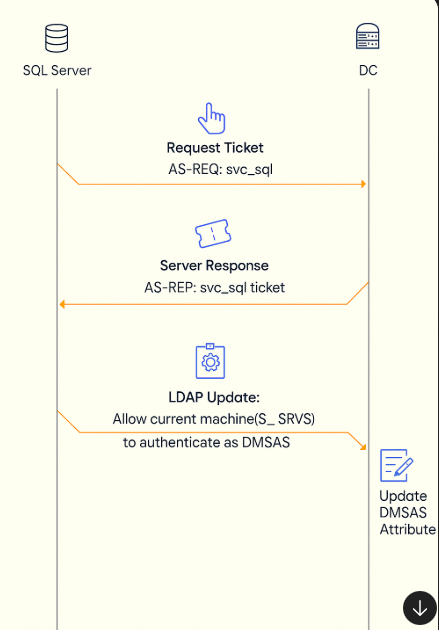
Authentication During Migration (Status = 1)
When a service tries to authenticate using a legacy account during migration, here’s what happens:
- Client sends AS-REQ to authenticate as the legacy account (like
svc_sql) - KDC responds with AS-REP containing a special
KERB-SUPERSEDED-BY-USERfield pointing to the dMSA - Compatible clients (Windows Server 2025/Windows 11 24H2) automatically:
- Extract the dMSA name from the response
- Query Active Directory for dMSA details (
msDS-GroupMSAMembership,distinguishedName,objectClass) - Automatically authorize the host by adding it to the dMSA’s membership list
The Automatic Authorization Process: The legacy account uses its write permissions (granted when migration started) to automatically add requesting hosts to the dMSA’s authorized users list. This keeps services running smoothly but creates a massive security hole.
Authentication After Migration (Status = 2)
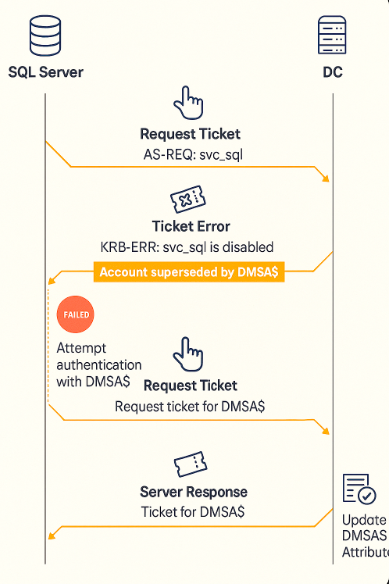
Once migration is done:
- Legacy account authentication fails with
KRB-ERROR(account disabled) - Error includes superseded-by information pointing to the dMSA
- Client automatically retries using dMSA credentials
- Authentication succeeds because the host was pre-authorized during migration
This creates a transparent transition where services automatically switch from legacy accounts to dMSAs without anyone having to touch anything. Pretty sweet, until you realize how badly it can be abused.
The PAC Inheritance Vulnerability
Understanding Kerberos PAC
The Privilege Attribute Certificate (PAC) is what actually matters for security in Kerberos tickets. It contains:
- User’s Security Identifier (SID)
- Group memberships and their SIDs
- Additional privilege information
Services use PAC data to make authorization decisions, so getting this wrong is catastrophic.
The Inheritance Flaw
What should happen: A dMSA’s PAC should contain only its own security information.
What actually happens: The dMSA’s PAC contains both its own SID and legitimate group memberships plus the superseded account’s SID and ALL its group memberships.
Real-World Impact Example
Let me give you a concrete example of how this goes wrong:
Legacy Account: svc_backup (member of “Backup Operators” group)
New dMSA: BACKUP_DMSA$ (configured with minimal database access permissions)
What the admin thought would happen: Reduce attack surface by migrating from over-privileged legacy account to properly scoped dMSA.
What actually happened:
- dMSA operates with intended minimal permissions
- BUT dMSA’s PAC includes “Backup Operators” group membership
- Services relying on PAC-based group membership checks grant unintended privileges like “Backup Operators” when the dMSA inherits them through a forged migration link
- Attack surface expanded instead of reduced
Domain Admin Escalation Scenario
Here’s the nightmare scenario:
- Legacy Account:
svc_legacy(has Domain Admin rights from years ago—you know how it is) - New dMSA:
WEBAPP_DMSA$(should only access web application resources)
The problem:
- dMSA’s PAC inherits Domain Admin SID and group memberships
- Any compromised service using this dMSA effectively has Domain Admin privileges
- Migration increased the security risk instead of reducing it
Conclusion
The core problem is how dMSAs interact with their predecessors through loosely validated attributes and inherited trust. While the design aims for smooth integration without breaking services, it introduces unintended privilege inheritance that attackers can exploit.
Now that you understand how dMSAs are supposed to work—and how they actually misbehave—let’s dig into how attackers turn this flaw into full-blown domain compromise.
In the Part 2 of this blog, I’ll walk you through BadSuccessor: a technique that lets low-privileged users forge migrations, hijack PACs, and escalate to Domain Admin or even Enterprise Admin with shocking ease.